# Network
##  Network
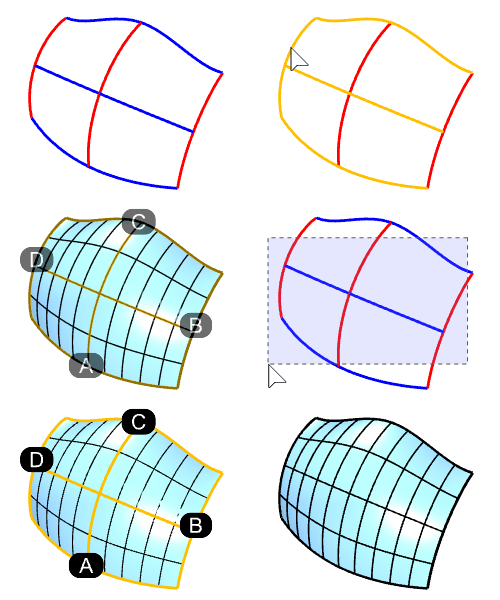
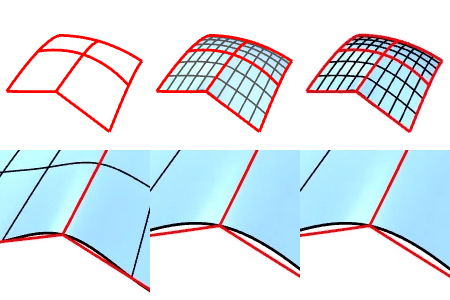
The NetworkSrf command creates a surface from a network of crossing curves.
* All curves in one direction must cross all curves in the other direction and cannot cross each other.
* The command always smooths out the output surfaces even if the input curves have kinks.
### Steps
* Pick the curves in two directions that form a network.
Or, use [Windows-selection](https://docs.mcneel.com/rhino/8/help/en-us/commands/selwindow.htm).
For more information about **NetworkSrf's Command-line Options**, please refer to the [Rhino documentation](https://docs.mcneel.com/rhino/8/help/en-us/commands/networksrf.htm).
---
# Agent Instructions: Querying This Documentation
If you need additional information that is not directly available in this page, you can query the documentation dynamically by asking a question.
Perform an HTTP GET request on the current page URL with the `ask` query parameter:
```
GET https://docs.rhinoartisan.com/commands/surface/network.md?ask=
```
The question should be specific, self-contained, and written in natural language.
The response will contain a direct answer to the question and relevant excerpts and sources from the documentation.
Use this mechanism when the answer is not explicitly present in the current page, you need clarification or additional context, or you want to retrieve related documentation sections.
Network
The NetworkSrf command creates a surface from a network of crossing curves.
* All curves in one direction must cross all curves in the other direction and cannot cross each other.
* The command always smooths out the output surfaces even if the input curves have kinks.
### Steps
* Pick the curves in two directions that form a network.
Or, use [Windows-selection](https://docs.mcneel.com/rhino/8/help/en-us/commands/selwindow.htm).
For more information about **NetworkSrf's Command-line Options**, please refer to the [Rhino documentation](https://docs.mcneel.com/rhino/8/help/en-us/commands/networksrf.htm).
---
# Agent Instructions: Querying This Documentation
If you need additional information that is not directly available in this page, you can query the documentation dynamically by asking a question.
Perform an HTTP GET request on the current page URL with the `ask` query parameter:
```
GET https://docs.rhinoartisan.com/commands/surface/network.md?ask=
```
The question should be specific, self-contained, and written in natural language.
The response will contain a direct answer to the question and relevant excerpts and sources from the documentation.
Use this mechanism when the answer is not explicitly present in the current page, you need clarification or additional context, or you want to retrieve related documentation sections.