# Quadrangulate Mesh
##  Quadrangulate Mesh
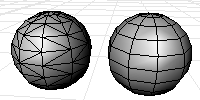
The QuadrangulateMesh command merges mesh triangles into quadrangles.
Diagonals that are unwelded (have unique vertexes at the corners) will not be considered as candidates for merging triangles into quadrangles.
Quadrangulate Mesh
The QuadrangulateMesh command merges mesh triangles into quadrangles.
Diagonals that are unwelded (have unique vertexes at the corners) will not be considered as candidates for merging triangles into quadrangles.
### Command-line options
* **Planarity**: The angle between the face normals of the triangles.
* **Rectangularity**: Specify a number greater than or equal to 1. If the adjacent triangles pass the planarity test then they will be merged into a quadrangle if the largest ratio of the lengths of the diagonal is less than or equal to the number you typed, then the triangles are converted to quadrangle.
* **Increment**: Increment value used by the spinner controls.
---
# Agent Instructions: Querying This Documentation
If you need additional information that is not directly available in this page, you can query the documentation dynamically by asking a question.
Perform an HTTP GET request on the current page URL with the `ask` query parameter:
```
GET https://docs.rhinoartisan.com/commands/mesh/mesh-retopology/quadrangulate-mesh.md?ask=
```
The question should be specific, self-contained, and written in natural language.
The response will contain a direct answer to the question and relevant excerpts and sources from the documentation.
Use this mechanism when the answer is not explicitly present in the current page, you need clarification or additional context, or you want to retrieve related documentation sections.