# Extract Mesh Faces
##  Extract Mesh Faces
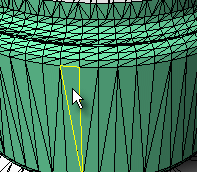
The ExtractMeshFaces command separates selected mesh faces from the parent mesh object.
This command works best in shaded mode, because you can pick the shaded mesh faces as well as the face edges.
### Command-line options
MakeCopy
* **Yes:** Makes a copy of the selected mesh faces rather than extracting them from the parent mesh object.
* **No:** Extracts the mesh faces leaving a hole in the parent mesh object.
---
# Agent Instructions: Querying This Documentation
If you need additional information that is not directly available in this page, you can query the documentation dynamically by asking a question.
Perform an HTTP GET request on the current page URL with the `ask` query parameter:
```
GET https://docs.rhinoartisan.com/commands/mesh/extract-mesh-faces.md?ask=
```
The question should be specific, self-contained, and written in natural language.
The response will contain a direct answer to the question and relevant excerpts and sources from the documentation.
Use this mechanism when the answer is not explicitly present in the current page, you need clarification or additional context, or you want to retrieve related documentation sections.
Extract Mesh Faces
The ExtractMeshFaces command separates selected mesh faces from the parent mesh object.
This command works best in shaded mode, because you can pick the shaded mesh faces as well as the face edges.

### Command-line options
MakeCopy
* **Yes:** Makes a copy of the selected mesh faces rather than extracting them from the parent mesh object.
* **No:** Extracts the mesh faces leaving a hole in the parent mesh object.
---
# Agent Instructions: Querying This Documentation
If you need additional information that is not directly available in this page, you can query the documentation dynamically by asking a question.
Perform an HTTP GET request on the current page URL with the `ask` query parameter:
```
GET https://docs.rhinoartisan.com/commands/mesh/extract-mesh-faces.md?ask=
```
The question should be specific, self-contained, and written in natural language.
The response will contain a direct answer to the question and relevant excerpts and sources from the documentation.
Use this mechanism when the answer is not explicitly present in the current page, you need clarification or additional context, or you want to retrieve related documentation sections.