# MakeSubDFriendly
##  MakeSubDFriendly
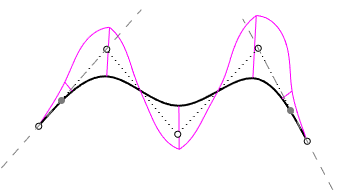
The MakeSubDFriendly command makes any curves SubD compatible.
* A SubD friendly curve is a degree 3 uniform curve.
* The second control points on both ends are constrained and locked. These points display with the locked object color.
* The first and last three control points are always collinear to maintain zero curvature at both ends.
* Moving or deleting Control Points or Edit Points will not destroy the SubD friendly characteristic.
* SubD creation commands (SubDLoft, SubDSweep1, SubDSweep2...) create a better SubD object from SubD friendly curves.
***
For more information, please refer to the [Rhino documentation](https://docs.mcneel.com/rhino/8/help/en-us/commands/makesubdfriendly.htm?Highlight=makesubdfriendly).
---
# Agent Instructions: Querying This Documentation
If you need additional information that is not directly available in this page, you can query the documentation dynamically by asking a question.
Perform an HTTP GET request on the current page URL with the `ask` query parameter:
```
GET https://docs.rhinoartisan.com/commands/subd/selection/makesubdfriendly.md?ask=
```
The question should be specific, self-contained, and written in natural language.
The response will contain a direct answer to the question and relevant excerpts and sources from the documentation.
Use this mechanism when the answer is not explicitly present in the current page, you need clarification or additional context, or you want to retrieve related documentation sections.
MakeSubDFriendly
The MakeSubDFriendly command makes any curves SubD compatible.
* A SubD friendly curve is a degree 3 uniform curve.
* The second control points on both ends are constrained and locked. These points display with the locked object color.
* The first and last three control points are always collinear to maintain zero curvature at both ends.
* Moving or deleting Control Points or Edit Points will not destroy the SubD friendly characteristic.
* SubD creation commands (SubDLoft, SubDSweep1, SubDSweep2...) create a better SubD object from SubD friendly curves.
***
For more information, please refer to the [Rhino documentation](https://docs.mcneel.com/rhino/8/help/en-us/commands/makesubdfriendly.htm?Highlight=makesubdfriendly).
---
# Agent Instructions: Querying This Documentation
If you need additional information that is not directly available in this page, you can query the documentation dynamically by asking a question.
Perform an HTTP GET request on the current page URL with the `ask` query parameter:
```
GET https://docs.rhinoartisan.com/commands/subd/selection/makesubdfriendly.md?ask=
```
The question should be specific, self-contained, and written in natural language.
The response will contain a direct answer to the question and relevant excerpts and sources from the documentation.
Use this mechanism when the answer is not explicitly present in the current page, you need clarification or additional context, or you want to retrieve related documentation sections.