# Append to mesh
##  Append to mesh
The 3DFace command creates mesh or SubD faces that can be standalone or added to an existing mesh or SubD.
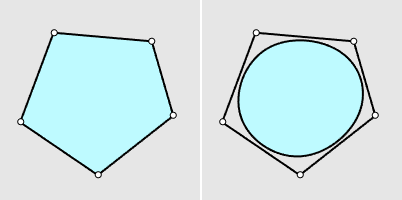
A mesh face (left) and a SubD face (right)
* When meshes or SubDs are pre-selected, the 3DFace command starts in the [Append](https://docs.mcneel.com/rhino/8/help/en-us/commands/3dface.htm#Append) mode.
### Command-line options
**Output**
**Mesh**
Creates mesh faces.
**SubD**
Creates SubD faces.
**Interpolated (Yes/No)**
|
Append to mesh
The 3DFace command creates mesh or SubD faces that can be standalone or added to an existing mesh or SubD.

A mesh face (left) and a SubD face (right)
* When meshes or SubDs are pre-selected, the 3DFace command starts in the [Append](https://docs.mcneel.com/rhino/8/help/en-us/commands/3dface.htm#Append) mode.
### Command-line options
**Output**
**Mesh**
Creates mesh faces.

**SubD**
Creates SubD faces.
**Interpolated (Yes/No)**
|  | |
| ------------------------------------------------------------------------------------------------------------------------------------ | -- |
| Yes | No |
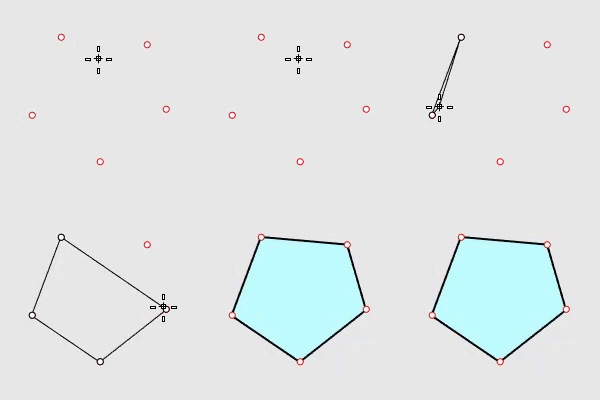
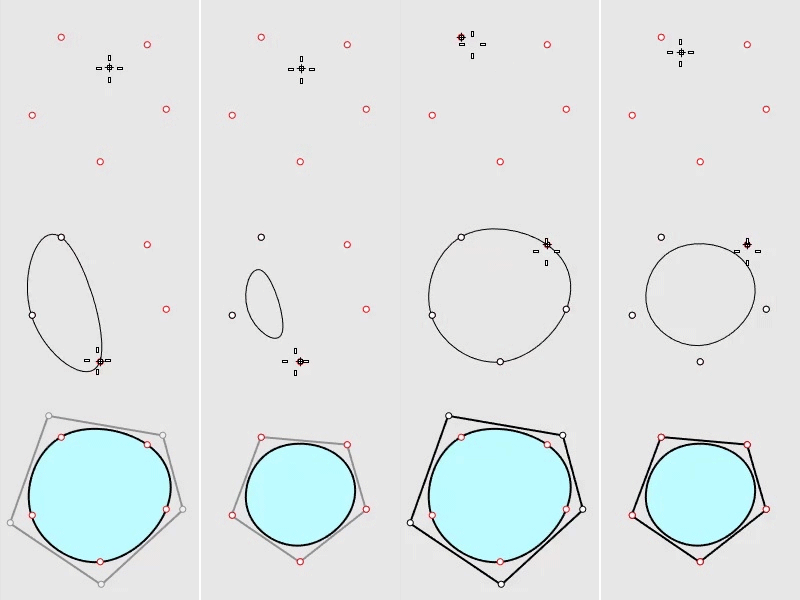
Conceptually, this is the difference between what the [Curve](https://docs.mcneel.com/rhino/8/help/en-us/commands/curve.htm) and [InterpCrv](https://docs.mcneel.com/rhino/8/help/en-us/commands/interpcrv.htm) commands do. The Curve command turns input points into the curve's control points. The InterpCrv command creates a curve to pass the input points.
**Append**
Selects an existing mesh or SubD to which the new faces will be added.
* During appending new faces, press ESC to cancel the current face creation. Press ESC one more time to cancel the command.
**PolygonType (Triangle/Quad/Ngon)**
Specifies to create triangle, quad, or n-gon faces.
* When PolygonType=Ngon, picking not enough points adds a triangle or quad face.
**FromEdge**
**Yes**
Each new face is started by selecting an existing mesh or SubD boundary edge.
**Chain (Yes/No)**
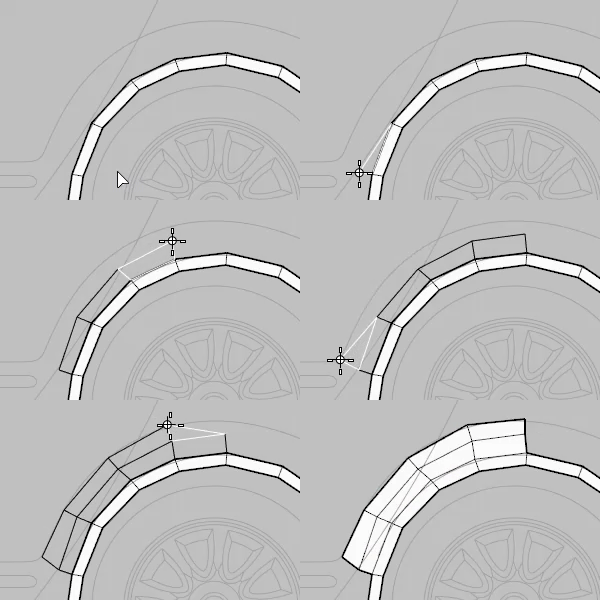
Create faces along an edge chain. The edge chain can be from an existing mesh or the current creating mesh.
This option is only available when PolygonType= Quad
**Example**
1. Click the Append option to select a mesh or SubD.
2. Set PolygonType=Quad, FromEdge=Yes, Chain=Yes, and Mode=MultipleFaces.
3. Select a boundary edge of the object.
4. Pick two points to form the first face.
5. Pick one point to form the next face and repeat.
6. Right-click to start a new edge chain.
**FromEdgeReset**
**Yes**
Resets FromEdge to No in the next 3DFace command session.
**No**
Remembers the setting of FromEdge for the next 3DFace command session.
**No**
Each new face is created by picking points.
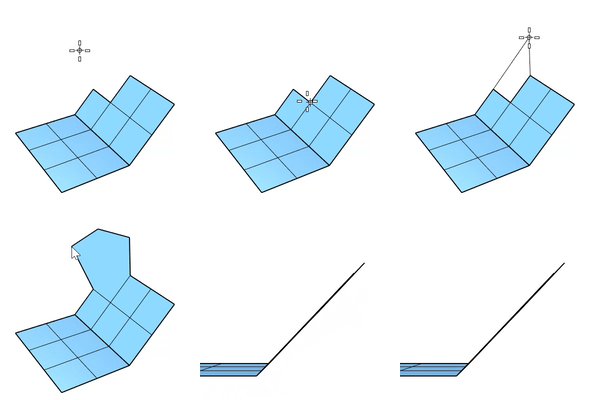
**InPlane (Yes/No)**
Set Yes to define a plane with the first three points and constrain the rest points of the current face on that plane. This option only takes effect when PolygonType=Quad/Ngon.
**WeldAngle (Only for Output=Mesh)**
The welding tolerance for mesh edges in degrees. Welding applies to edges around new faces. The default angle is 180 degrees that welds all edges.
**Mode (SingleFace/MultipleFaces)**
Specifies to create only one or more faces in a command session.
**Undo**
Removes the previous pick.
---
# Agent Instructions: Querying This Documentation
If you need additional information that is not directly available in this page, you can query the documentation dynamically by asking a question.
Perform an HTTP GET request on the current page URL with the `ask` query parameter:
```
GET https://docs.rhinoartisan.com/commands/mesh/mesh-modifications/append-to-mesh.md?ask=
```
The question should be specific, self-contained, and written in natural language.
The response will contain a direct answer to the question and relevant excerpts and sources from the documentation.
Use this mechanism when the answer is not explicitly present in the current page, you need clarification or additional context, or you want to retrieve related documentation sections.
| |
| ------------------------------------------------------------------------------------------------------------------------------------ | -- |
| Yes | No |
Conceptually, this is the difference between what the [Curve](https://docs.mcneel.com/rhino/8/help/en-us/commands/curve.htm) and [InterpCrv](https://docs.mcneel.com/rhino/8/help/en-us/commands/interpcrv.htm) commands do. The Curve command turns input points into the curve's control points. The InterpCrv command creates a curve to pass the input points.
**Append**
Selects an existing mesh or SubD to which the new faces will be added.
* During appending new faces, press ESC to cancel the current face creation. Press ESC one more time to cancel the command.
**PolygonType (Triangle/Quad/Ngon)**
Specifies to create triangle, quad, or n-gon faces.
* When PolygonType=Ngon, picking not enough points adds a triangle or quad face.
**FromEdge**
**Yes**
Each new face is started by selecting an existing mesh or SubD boundary edge.
**Chain (Yes/No)**
Create faces along an edge chain. The edge chain can be from an existing mesh or the current creating mesh.
This option is only available when PolygonType= Quad
**Example**
1. Click the Append option to select a mesh or SubD.
2. Set PolygonType=Quad, FromEdge=Yes, Chain=Yes, and Mode=MultipleFaces.
3. Select a boundary edge of the object.
4. Pick two points to form the first face.
5. Pick one point to form the next face and repeat.
6. Right-click to start a new edge chain.

**FromEdgeReset**
**Yes**
Resets FromEdge to No in the next 3DFace command session.
**No**
Remembers the setting of FromEdge for the next 3DFace command session.
**No**
Each new face is created by picking points.
**InPlane (Yes/No)**
Set Yes to define a plane with the first three points and constrain the rest points of the current face on that plane. This option only takes effect when PolygonType=Quad/Ngon.

**WeldAngle (Only for Output=Mesh)**
The welding tolerance for mesh edges in degrees. Welding applies to edges around new faces. The default angle is 180 degrees that welds all edges.
**Mode (SingleFace/MultipleFaces)**
Specifies to create only one or more faces in a command session.
**Undo**
Removes the previous pick.
---
# Agent Instructions: Querying This Documentation
If you need additional information that is not directly available in this page, you can query the documentation dynamically by asking a question.
Perform an HTTP GET request on the current page URL with the `ask` query parameter:
```
GET https://docs.rhinoartisan.com/commands/mesh/mesh-modifications/append-to-mesh.md?ask=
```
The question should be specific, self-contained, and written in natural language.
The response will contain a direct answer to the question and relevant excerpts and sources from the documentation.
Use this mechanism when the answer is not explicitly present in the current page, you need clarification or additional context, or you want to retrieve related documentation sections.